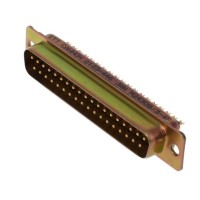
When troubleshooting circuits using the ITT Cannon M24308/3-4F 37-position D-Sub plug, a systematic approach is critical. This component is a workhorse in industrial, telecom, and computing applications, but its electromechanical nature makes it prone to specific, repeatable failure modes. The following guide draws from real field experiences to help you isolate and resolve issues efficiently.
Typical Failure Modes and Root Causes: The most common issues are intermittent connections and short circuits. Intermittency often stems from contact corrosion (especially in non-environmentally sealed applications), fretting corrosion from micro-vibration, poor solder joint integrity on the PCB pins, or mechanical stress on the panel mount ears leading to cracked internal joints. Short circuits are frequently caused by solder bridging during assembly due to the tight pin pitch, or by damaged insulation displacement contacts if using crimp-style versions. A less obvious failure is increased contact resistance, which can cause voltage drops and thermal issues under current load.
Step-by-Step Debugging Methodology: First, perform a visual and mechanical inspection. Check for bent pins, cracked solder joints, and ensure the connector is fully seated and the screws are tightened to prevent movement. Next, with power off and the connector disconnected, use a digital multimeter (DMM) in continuity mode to check for shorts between adjacent pins on the PCB footprint. Then, verify each pin's connectivity through the connector by probing from the PCB solder joint to the corresponding female contact in the mated pair. Look for erratic readings. If intermittent, gently wiggle the connector and cable while measuring. For powered debugging, use a DMM to measure voltage drops across suspected pins under load; a drop of more than a few millivolts can indicate a high-resistance contact.
Common Mistakes in Schematic Design and PCB Layout: A frequent schematic error is incorrect pin numbering. The M24308/3-4F pinout is not always intuitive; always cross-reference the manufacturer's datasheet. In PCB layout, the most critical error is insufficient clearance between pads for the 37 pins, leading to solder bridges. Ensure your design follows the recommended pad geometry. Also, failing to provide a solid mechanical mounting with the panel ears can transfer strain to the solder joints. The ground pins/shield should be connected to the chassis ground via a low-inductance path, often overlooked, leading to EMI issues.
How to Verify Component Authenticity and Quality: Counterfeit connectors are rampant. Authentic ITT Cannon parts will have clear, laser-etched or molded markings with the part number, brand, and often a date/lot code. Inspect the finish; the shell should be robust with a consistent plating, and contacts should be shiny and springy. Be wary of pricing that seems too good to be true. Purchase from authorized distributors whenever possible. For high-reliability applications, consider batch testing a sample: measure contact resistance with a 4-wire milliohm meter and perform mating cycle tests.
Measurement Techniques and Test Equipment: Beyond a basic DMM, a milliohm meter is invaluable for quantifying contact resistance. For diagnosing intermittent connections, a time-domain reflectometer (TDR) option on a modern oscilloscope can identify faults in the connector and attached cabling by locating impedance discontinuities. To check for signal integrity issues caused by the connector, use an oscilloscope to compare signal quality (rise time, ringing) at the source and after passing through the mated connector pair. A thermal camera can quickly pinpoint a overheating pin due to high resistance under load.
When to Suspect the Component vs. the Surrounding Circuit: Suspect the D-Sub connector first when symptoms are intermittent and correlate with physical movement, when multiple unrelated signals on different pins are affected, or when problems manifest immediately at the system boundaries (i.e., at the port). Suspect the surrounding circuit when issues are consistent and isolated to a specific functional block, or when measurements on the PCB side of the connector solder joints show correct signals. A key tactic is to bypass the connector temporarily with jumper wires; if the circuit functions, the connector is likely at fault.
Real-World Case Studies: In one case, a data acquisition system had random channel dropouts. Visual inspection was clean. Intermittent opens were found on several pins during a wiggle test. The root cause was fretting corrosion on the gold-plated contacts due to machine vibration. The solution was to specify a connector with a higher durability rating and apply a stabilizing contact lubricant at assembly. In another case, a new design had two RS-485 ports where one was non-functional. Continuity check revealed a short between two adjacent pins. Microscope inspection showed a nearly invisible solder bridge caused by an overly aggressive stencil aperture in the PCB layout. Correcting the pad design and reworking the board resolved it. A third case involved gradual system lock-ups in a hot environment. Thermal imaging showed pin 29 (a power pin) was significantly hotter than others. Measurement confirmed high contact resistance in that specific socket of the mated female connector, requiring replacement of the cable assembly.